Wednesday, 8 October 2014

Game 2 design process (Part 5)

After the last post in which I mentioned the difficulties I was having with the level, I had played with it some more and ended up kind of breaking it, so I scrapped the level I had started and created a new one from scratch. This new level contained most of what the old one did, just with different code and a new terrain. I was able to reuse the following assets:

  • pirate airship (bloater/cutter)
  • order tower (with a few modifications)
  • order turret
  • terrain and model textures
  • custom skybox
So as a quick re-design process, I started with redoing the layout of the game. Since full 3D was not working for me, I decided to make the new game as "faux" 3d, so the player will only be able to move in two dimensions, not three. For this, I decided to make a heightmap of the level to import into Unity.


Markers were added to the heightmap to show the flow of the game:


The updated asset list now looks like this:


Game Object Asset List
       High priority
Mid priority
Low priority
 cutter (pirate airship/hero)
 skybox
 pirate galleon (return point)
 order tower
 sunflare
 cutter animation
 order turret
 pickup object (treasure)
 turret animation
 terrain

 background animations


 particle effects


We also have to create a texture list so here it is:

Game Texture Asset List
       High priority
Mid priority
Low priority
Cutter:
Skybox:
Sunflares
-         sailcloth (balloon)
-          skybox textures

-          rigging (rope)
-          clouds for skybox
Water texture
-          balloon trim (copper)


-          boat planking/deck
Bullet texture
Background animation textures (birds, etc)
-          boat trim


-          fins
Terrain:


-          rock (x 3)

Order tower:


-          roof tiles
 Pickup item texture

-          bricks


-          piping


-          vents


-          supports/fencing/floor


Order turret:


-          sailcloth with cog (balloon)


-          rigging (rope)


-          gun barrel


-          gun body


After that I imported the heightmap into Unity and started smoothing it to make the terrain I wanted. The import worked well, though was a little high, so I lowered it significantly. It made a good rugged, clifflike terrain, so now the player is flying through the "Cliffs of Despair" to get to the tower.

The custom skybox was then added and ended up looking reasonable. The skybox is essentially a gradient blue square large resolution picture, which was divided using a program called Cube the Sphere. After it was imported to Unity I then took the individual section images and added some clouds that I created in Photoshop. I probably could have done some more work on the clouds, but I was happy with the end result.

With the terrain after I had painted on the textures, I used the free version of Unity water to place over the base, to give the illusion of depth. The free water is not awesome, but it does the job.

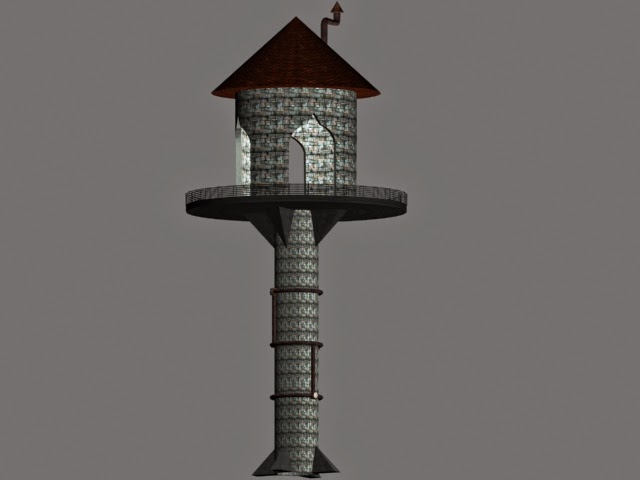
I then added the structures I needed - the tower, the cutter (airship), and the turrets.

After that I started working on the code I needed. After a bit of research I ended up using a character controller for the airship, as it is quite simple and stable. The airship was soon happily zooming about my terrain. At that point I discovered a small issue: the airship, moving on two dimensions only, could not access the top of the tower in order to get the pickup object.

I took the tower back to 3DS Max and made a ramp to reach the top of the tower using lofting. I then cut out a portion of the platform so the airship could travel through it, textured it again, and reimported the tower with the ramp to Unity.


After testing it, the airship can now fly quite happily up the ramp to the top of the tower.

I then created an end point for the ship to fly back to after picking up the treasure. This was essentially a non-rendered plane with an image of the pirate logo to return to, setting off a trigger event to load the game over screen.

I then started working on code for the ship to be able to pick up the treasure, be affected by turret bullets, etc. At this point I started having issues with the ship as the character controller has conflicts with collisions and triggers, etc. I spent a fair amount of time working out some resolutions including OnControllerColliderHit (which didn't work), using layers (which didn't work), removing the character controller and reverting to normal movement with a rigidbody for the airship (which didn't work and added additional problems so I removed it again), using separate collision boxes for the end point and the tip of the cutter (which didn't work). 

At this point I gave up on getting that to work and went back to adding some effects to the game. I added particle effects to the vents on the tower and one to the treasure pickup item. I had wanted to make the pickup particle effect turn off when it was picked up, but that didn't happen as the trigger event didn't happen. I also added a render fog effect, so now the terrain doesn't look quite so stark.

The final updates I made to the game was getting the UI working using the new Unity UI options. This worked perfectly first go, so I was pretty happy with that. I used the clouds I'd created as a background, made some fancy text, set up the buttons and imported a nice font to Unity for the button text, and away it went.


I did one build and realised that, since trigger events weren't working, I had no way to exit the play screen. So I added another button to go back to Start.


After that, I had to rush into class to get the game handed in on time. At this point the game had working UI, a level, and a moving player, but no interactions due to the difficulties I mentioned above. So essentially a not fully functional game, which I was disappointed about, but I think I didn't do too badly given I pretty much did it all the night and day of handing it in.

Things I would add to/ fix in the game:
  • an "about" page to explain the story behind it
  • get the triggers working so health was affected, turrets shot properly, pickup could be picked up, and end point could be reached
  • add audio (there is none in the game at present)
  • animate the UI (moving cogs)

Wednesday, 1 October 2014

Game 2 design process (Part 4)

It's been a while since my last update which is basically because of the fact that I pretty much haven't done anything on the game in the past week or more. Which yes I know is a Bad Thing but you get that.

Anyway the progress that I have made so far is to get the important assets done. The terrain is done, however I have a feeling I am going to need to make it much bigger than it currently is. I've made a custom skybox for it, which is just a gradient colour at the moment though I'd like to add some clouds. I'll probably add a sun and sun flare if I get the chance. I have created both a tower where the loot is stashed, and the bloater that flies into it to collect the loot.

Behold the glory:


The aim is to make steam come out of those vents in game.

The tower does end up being super super dark in Unity, and some of the textures flipped about a bit, so I'll have to work on that.

The game itself, unfortunately, is not progressing quite as well. I am having issues repurposing the demo airplane code etc to work with the bloater. I'm also having issues with getting the turret's bullets to actually hit the plane as it flies past. The turret can detect the plane, and it shoots when it gets in range, and then the bullet flies in a lovely parabolic trajectory and doesn't actually hit anything. I've tried fixing it but pretty much all the code I can find is either in Javascript which I'm having issues in translating to C#, adds additional errors to my existing code, or is just plain incomprehensible. I'm also spending a lot of time trying to work out the physics for how the bloater is going to fly using the plane script's variables.

Currently I'm researching how to get the turrets to spawn in random locations in the terrain region, so every time the game is played they'll be in a different spot.

I think my main issue with this game is that I'm just not feeling fun and excited about it like I was with the prehistoric one, I think mainly because this one is much more difficult to bring about. I may have overreached with it, I'm thinking.

Saturday, 6 September 2014

Game 2 design process (Part 3)

I'm currently working on getting some assets created for the steampunk game.

Like the last game, it really doesn't require terribly much in the way of assets. Currently my asset list looks like this:

Game Object Asset List
       High priority
Mid priority
Low priority
turret
pirate galleon
background animations (birds flying, etc)
cutter
pickup object (treasure)

tower
turret animations

pickup object (health)
cutter animations

terrain


I've made a turret in 3DS Max, which didn't turn out too badly. I may need to add some more steampunky type textures or gadgets to it, but otherwise it's pretty good.


When I get a bit more progressed I want to add some animations to it, a bobbing in the air one where the balloon constricts and expands slightly, and a gun firing one where the barrels go in and out. That's not a high priority at the moment, however.

In code class yesterday we looked at navmesh and basic enemy AI interactions. With the help of Paul I got a simple script for a stationary enemy (ie, the turrets) to look at a designated target. I then added to this to make the turret fire a "bullet" at them when they get within a certain range. At the moment it fires 50 million bullets at the target but at least it's on the right track! I'll add a delay and a destroy to the script to cut that down.

The next object to design is the pirate cutter, the "bloat", and tomorrow I'll probably also start playing with the terrain.


Thursday, 4 September 2014

Game 2 design process (Part 2)

So, progressing with the steampunk game.

I've been collecting a fair few reference images to try and get my head around the theme and look. Most of them are airship related as essentially that's what the game's about:


I have a few tower ones as well, I'm still trying to figure out the tower look:


And I have a random collection of piratey, skull, cog, and tool type things, which will be for iconography and the like:


I have essentially decided to go with the airship pirate thing. I've also written a quick background for it:


The scan got a bit cut off, but it reads:

Rumour has it that the Order of the Adamantine Cog (my titular "establishment") has amassed a vast treasure and stashed it in a mighty tower on a lonely island in the Ocean of Winds. (I haven't thought of a name for the tower yet...) As the fastest airship pilot of your trusty pirate crew, it is your job to "liberate" the loot, but be warned! The Order expects such action and has protected its tower with airborne turrets. Fly fast to avoid the turrets, recover the loot, and return to your pirate galleon to share the booty!

Style wise I'd like to have it looking all nice and airy, very influenced by the early Columbia stages of Bioshock Infinite. The Order is all neat and tidy and regimented. All their ships look the same.

The pirates on the other hand are free and individualistic. Their stuff isn't as shiny, but it gets the job done. With a bit of tinkering, a la Millennium Falcon!

I've also done some sketches of how I'm thinking of things at the moment.


Like I said, the tower stuff isn't nearly done yet, and I still haven't figured out a pirate galleon design. However I'm pretty happy with my turret sketches and I like the final pirate cutter (the one with the spiney thing).

I've also been thinking of a possible title and am leaning towards either Bloater Ace or Bloater Hoist. A "bloater" is a steampunk term for a small pirate-style steam driven dirigible. "Ace" has the usual connotation especially for flying. "Hoist" in this case refers to stealing, especially shoplifting.

Decisions decisions!

Sunday, 31 August 2014

Game 1 design process (Part 7)

Okay after another day's work this game is done. Yay!

In Friday's class I spoke to Mark and quickly sorted out the issue with the UI not loading new levels. The issue turned out to be operator cause, naturally *rolls eyes*. For future reference, don't drag the script onto the on click area, drag the game object with the script attached onto it.

Mark also helped with getting the countdown timer working with text, and I adapted that to get the health counter working too.

For prettiness, I added a particle effect to my tar pit so now it's really obvious it's the destination point.

I added sounds as well - a random array of "ows" for when the bubble hits the thorn bushes, and a looping piece of background music. The background music I found on Freesound.org and played with it until I got it sounding more or less how I wanted it to. Credits page was updated with the details, and all is good.


I am currently considering adding some PlayerPrefs to the game. The game is finished as it stands presently, however. Yay!

Now onto the next one!

Thursday, 28 August 2014

Game 2 design process (Part 1)

So I don't have to do a massive catch up for this one, here's the details on my second game of the semester.

The game is required to be of a steampunk genre and with a theme of "rescue". Everything else seems to be up for grabs.

I was actually a bit disappointed by the change as I had an awesome idea for an underwater game. Oh well. It's in my ideas book, now.

Anyway. I've been playing a lot of Bioshock Infinite lately so I had the idea of airships stuck in my head. So I thought it would be kind of cool to do a flying airship game.

I was warned by Mark that having it in an open world would be difficult, but me being stubborn as I am, I really want to go open world!

So, steampunk. Steampunk is essentially stuff that is Victorian and sci-fi at the same time. The thing with steampunk is that it's both grand and grungy simultaneously. There is steam, yes, but there is also gilt. It's a challenge, design wise.

So, steampunk airships, and have to rescue a thing. I'm loathe to do the typical "rescue the girl" because steampunk typically has strong women characters who don't really need rescuing. Also it's been done to bits. Rescue the "thing" though sounds okay.

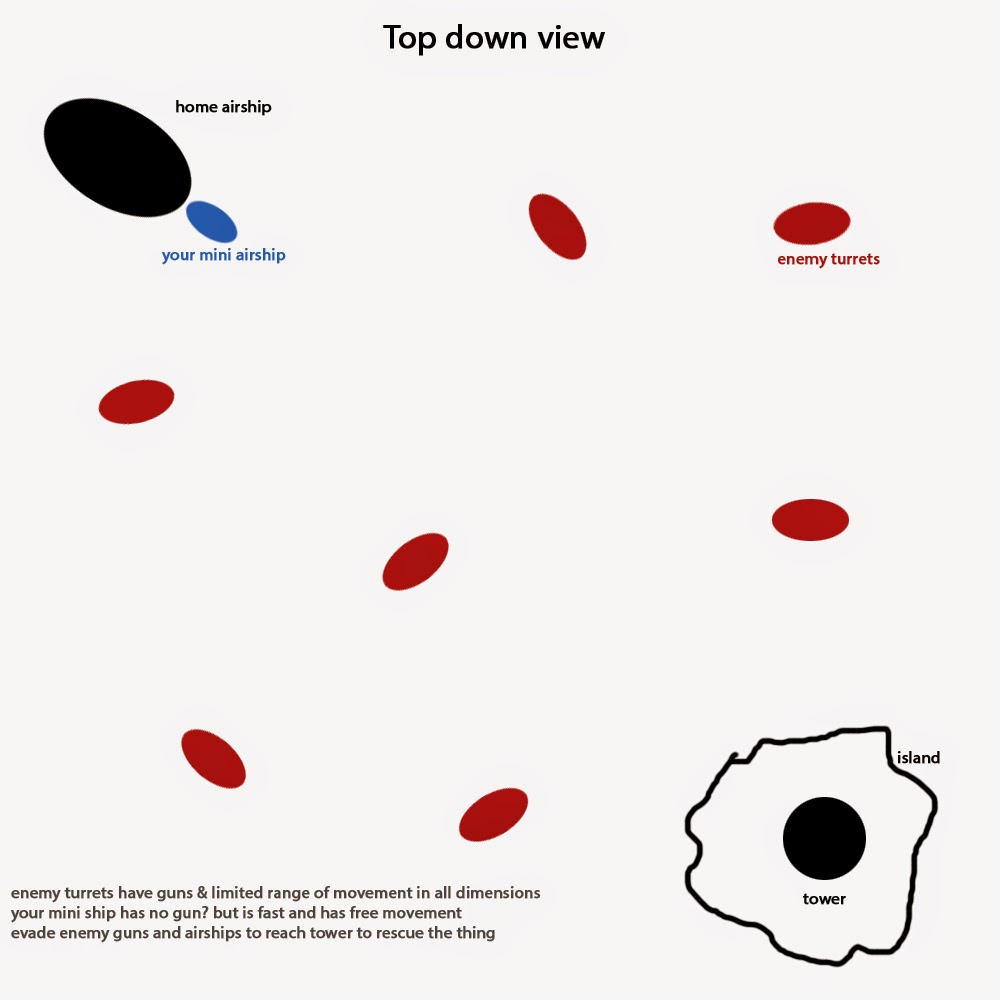
Anyway, I started concepting a level:


The idea at the moment is to have a massive airship where the player starts, and they need to get to the tower to "rescue the thing". The tower is set in the middle of an endless ocean. The player will be in their own mini airship. The red balloons are enemy turrets. The turrets have a reasonable amount of fire power, but are slow and only have a very limited range of movement. The mini airship will be quite fast and manoeuvrable, and I'm undecided yet as to whether it will have weapons. Once the player has reached the tower, they will pick up the "thing", and then have to return to the massive airship to win.

At the moment I'm leaning towards steampunk airship pirates, most likely as the player (you must go to the tower to "liberate" the booty, arrrr) and the enemy turrets being those of the "establishment".

I'll probably set it in a massive terrain, build the sides right up so the player can't fly out of them and a cap on the top as a roof, put in an island, build a nice tower on it, and add water for the ocean.

Hopefully it won't be too bad to make!

Game 1 design process (Part 6)

As a brief update.

My game is having issues with the new UI system and loading levels. The very first one I added worked, the rest of them don't, and they've come up with funny naming conventions. I've tried deleting them and re-creating them, but that didn't change anything. I'll show the experts tomorrow.

I got the bubble health working, now he has 10 health and every time he hits a thorn bush he loses one. When he hits 0, the game is over.

I made a flat cylinder in Max and deformed it a little for my tar pit, imported it to Unity and added the tar pit texture. Set it up with a rigidbody and a collider and now when my bubble reaches the tar pit, the game is over.

GUIText doesn't work in the new version of Unity. Am trying to figure out how to get my countdown timer which asks for GUIText to work asking for the new UI text. Again, leaving that one for the experts tomorrow.

However, build levels are set up and it's otherwise ready to go. I hate how this takes forever to get anywhere!